Action Box5.0.1
Publisher Description
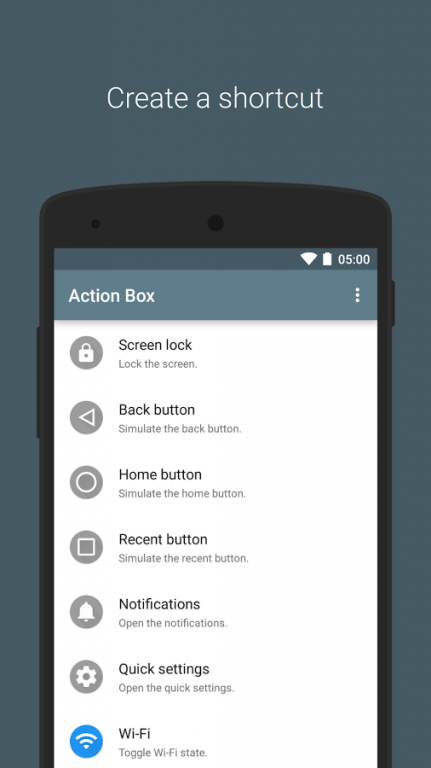
Action Box allows you to create more shortcuts.
In addition, it is also possible to perform an action from the Android Wear.
Function
・Screen off※1
・Back button(Android4.2 or later only)※2
・Home button(Android4.2 or later only)※2
・Recents button(Android4.2 or later only)※2
・Status bar expand
・Quick setting panel expand(Android4.2 or later only)
・Wi-Fi Toggle(ON/OFF)
・Wi-Fi Tether Toggle(ON/OFF)
・Bluetooth Toggle(ON/OFF)
・Bluetooth Tether Toggle(ON/OFF)
・AutoRotate Toggle(ON/OFF)
・AutoBrightness Toggle(ON/OFF)
・RingerMode Change
・Play/Pause
・Next
・Previous
※1 There is a need to enable the Action Box in the "Security → Device administrators" from the settings app of your terminal.
※2 You need to enable the Action Box in the "Accessibility" from the settings app of your terminal.
If you wish to support the application of the translation, please contact the developer.
About Action Box
The company that develops Action Box is Chaos Dream Application. The latest version released by its developer is 5.0.1. This app was rated by 1 users of our site and has an average rating of 3.5.
To install Action Box on your Android device, just click the green Continue To App button above to start the installation process. The app is listed on our website since 2016-03-07 and was downloaded 2,065 times. We have already checked if the download link is safe, however for your own protection we recommend that you scan the downloaded app with your antivirus. Your antivirus may detect the Action Box as malware as malware if the download link to dream_chaos.java_conf.gr.jp.actionbox is broken.
How to install Action Box on your Android device:
- Click on the Continue To App button on our website. This will redirect you to Google Play.
- Once the Action Box is shown in the Google Play listing of your Android device, you can start its download and installation. Tap on the Install button located below the search bar and to the right of the app icon.
- A pop-up window with the permissions required by Action Box will be shown. Click on Accept to continue the process.
- Action Box will be downloaded onto your device, displaying a progress. Once the download completes, the installation will start and you'll get a notification after the installation is finished.
Program Details
System requirements
Download information
Pricing
Version History
version 5.0.1
posted on 2016-03-07
[Ver 5.0.1]2016/3/8,・Fix bug,[Ver 5.0.0]2016/2/28,・Change icons,・Add AutoBrightness,・Add Settings,・Fix bug
